Pixabye: A Bold Display Font for Handmade Sellers
If you have ever spent hours tweaking a label design only to find the text looks muddy when printed, or watched a beautiful sticker lose its charm because the lettering is too delicate for the cutting machine, you know that choosing the right typeface is just as important as the artwork itself. As a maker who creates everything from wedding invitations to farmhouse signs, I am always on the lookout for display fonts that combine personality with performance. That is why Pixabye caught my attention. This bold and authentic decorative font brings a confident, handcrafted feel to any project, while staying readable even at smaller sizes. Let me walk you through why this font deserves a spot in your design toolkit.
What Makes Pixabye Stand Out
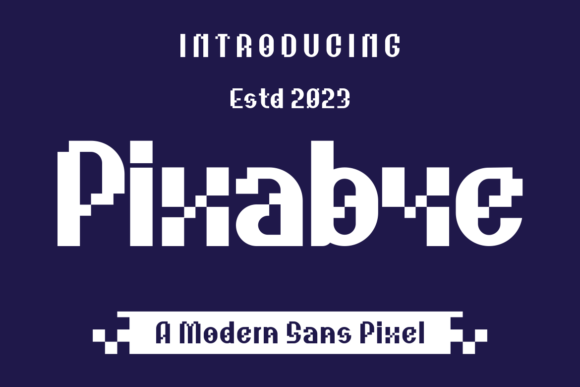
Pixabye is not just another pretty font. It is a display typeface with a strong, striking presence. The letterforms are chunky and substantial, yet they carry a touch of warmth that makes them feel approachable rather than heavy. The strokes are clean and consistent, with just enough character to keep the text from looking sterile. Whether you are designing a logo for a small-batch candle company or creating a custom sign for a cozy coffee shop, Pixabye delivers that handmade, artisanal vibe that shoppers love.
This font thrives in short, bold statements. It is perfect for product names, taglines, shop names, and any text that needs to grab attention fast. Because it is a display font, it works best at larger sizes—think titles, headers, and focal points. The personality of Pixabye shines when you pair it with a simpler, more neutral font. For example, using Pixabye for the main word on a label and a clean sans serif for the ingredients list creates a balanced, professional look.
Practical Uses for Your Craft Business
I have tested Pixabye across several product categories, and it consistently delivers strong results. Here are some of the most effective ways to use it in your own handmade or printable shop.
Labels and Stickers
Small product labels demand a font that stays legible no matter how much you scale it down. Pixabye holds up beautifully on 2-inch round labels for bath salts or lip balms. The thick strokes mean the letters do not get lost when printed on textured paper or applied to matte jars. For sticker sheets, the font cuts cleanly on both Cricut and Silhouette machines. I recommend setting the cut line slightly inside the lettering to avoid nicking the thicker parts. Pixabye also works well for layered sticker designs, where the bold outline contrasts nicely with a lighter background.
Greeting Cards and Invitations
Birthday cards, thank you notes, and save-the-dates all benefit from a font that says “I made this.” Pixabye adds a tactile, hand-lettered feel to card fronts. Try using it for the main greeting, then pair it with a simple serif font for the body text inside. For wedding invitations, the font is especially effective on welcome boards, seating charts, and escort cards. The bold lettering is easy to read from a distance, which is a huge plus for event signage.
Signs and Wall Art
Farmhouse-style signs, inspirational quotes, and seasonal wall art are a staple for many crafters. Pixabye gives these pieces a rustic, sturdy look that complements reclaimed wood, chalkboard backgrounds, and bold paint colors. The font works great for single-word prints like “joy,” “home,” or “gather,” as well as short phrases. Because the letterforms are so solid, you can even use Pixabye for text that you cut out of vinyl or wood and then apply to a surface.
Product Packaging and Tags
Whether you sell handmade soaps, candles, or clothing, your packaging is the first thing customers see. Pixabye helps you create tags that look both professional and personal. Use it for your brand name on a hang tag, or for the product title on a kraft paper box. The font’s boldness ensures the text stands out against natural materials like burlap, twine, or cardboard. I have used it for holiday gift tags and miniature thank-you cards tucked into orders, and it always gets compliments.
Mugs, Totes, and Shirts
Heat transfer vinyl and screen printing require fonts that are not too intricate. Pixabye is a dream for apparel and accessories. The thick lines weed easily, and the letters stay intact even after multiple washes. For a tote bag, try a simple phrase like “market day” in Pixabye, paired with a small floral or geometric icon. For mugs, the font works well for names, short quotes, or seasonal sayings. Just remember to mirror your design if you are using sublimation or transfer paper.
Readability and Production Tips
One concern crafters often have about display fonts is whether they will be readable when printed small. With Pixabye, I have found that even at 12-point size, the letters remain clear and distinct. The thick strokes help, but the font also has good spacing between characters, so words do not bleed together. For cutting machines, I recommend using a fine-point blade and a light grip mat to avoid tearing delicate parts of the letters. If you are printing on dark materials, consider using a white or metallic foil transfer to make the bold shapes pop.
When designing for stickers or labels, always test your layout at actual size before committing to a large run. Pixabye’s boldness can sometimes make a word feel heavier than intended, especially if the text is all caps. Using the font in title case or with a mix of upper and lowercase can soften the impact while still keeping the strong presence. The font also includes a few alternate characters and ligatures, so explore the full character set to customize your text.
Pairing Pixabye with Other Fonts
No typeface is an island, and Pixabye works best when it has a complementary partner. For a modern, clean look, pair it with a sans serif font like Montserrat or Lato. Use the sans serif for body text, descriptions, or secondary information. The contrast between the bold display font and the streamlined sans serif creates a professional, balanced layout.
If you want a more classic or elegant feel, combine Pixabye with a serif font such as Playfair Display or Crimson Text. The serif adds a touch of sophistication, while Pixabye keeps the design grounded and approachable. This pairing works well for wedding stationery, upscale product labels, and boutique branding.
For a playful, handcrafted vibe, try a script font or handwritten font alongside Pixabye. Use the script for a single word or a flourish, and Pixabye for the main headline. This combination is especially effective for seasonal products, children’s party invitations, or artisan food packaging. The key is to keep the script font simple and legible, so it does not compete with Pixabye’s boldness.
File Formats and Multilingual Support
When you download Pixabye, you typically receive standard font file formats such as OTF (OpenType) and TTF (TrueType). These work seamlessly with most design software, including Adobe Illustrator, Photoshop, Canva, and Cricut Design Space. The font includes basic Latin characters, numbers, and punctuation, which covers most English-language projects. If you need accented characters or extended language support, check the product description to see the exact character set. Many premium display fonts now include a wide range of glyphs, and Pixabye is no exception.
Licensing for Commercial Use
Before you start selling products that feature Pixabye, take a moment to review the licensing terms. Most premium fonts operate under a standard commercial license, which allows you to use the font for physical products you sell, such as shirts, mugs, stickers, and packaging. If you create digital downloads like printable wall art, planner pages, or SVG templates, you may need an extended license that covers the distribution of the font as part of your design files. Always check the license details provided by the font creator. This protects both your business and the designer’s work.
For client projects, such as designing a logo for a local bakery or creating a wedding invitation suite, a standard commercial license usually suffices. But if you plan to sell the font itself or bundle it as part of a design resource, you will need a different type of license. When in doubt, contact the seller for clarification. It is a small step that can save you from legal headaches down the road.
Final Practical Advice
Pixabye has become one of my go-to fonts for projects that need a strong, authentic voice. Whether I am designing a label for a small-batch hot sauce, a welcome sign for a friend’s wedding, or a set of holiday tags for my Etsy shop, this font delivers. It is bold enough to stand alone, yet flexible enough to pair with a variety of other typefaces. Its readability across different sizes and materials gives me confidence that the final product will look as good on a customer’s doorstep as it did on my screen.
If you are a crafter or a small business owner who values both beauty and practicality, give Pixabye a try. Test it on your next label, sticker, or sign project. You might find that this bold display font becomes a staple in your creative toolkit too.